The History of PDF: From the Internal “Camelot” Memo to PDF 2.0 — A Living Chronicle of a Format That Outlived Them All

Why PDF Was Needed in the First Place
Picture the early 1990s. Computers could already compose complex documents, fonts and printers were multiplying, the internet was knocking on the door, and compatibility was still a lottery. You sent a file, and the recipient had:
- a different font set — the layout shifted;
- a printer driver that interpreted color differently — the print looked dirty;
- no editor — nothing to open it with;
- a layout that looked one way on screen and another on paper.
What was needed was a universal page container so a document looks and prints the same everywhere, without requiring the same app and fonts, and outlives applications and operating systems. That idea became PDF.
Roots: PostScript and “Electronic Paper”
In the 1980s Adobe had already won over print with the page description language PostScript. It was perfect for printing, but not for exchange: heavy and device- or context-dependent. The world needed a compact, portable, self-contained format that packs everything inside: fonts, vectors, rasters, color profiles, links, metadata.
The idea is simple: what you see is what you print. Electronic paper that doesn’t lose its shape when moved.
The Moment of Conception: The “Camelot” Memo and Code Name “Carousel”
- 1991 — Adobe cofounder John Warnock writes the internal Camelot memo. It formulates the goal: create a format for reliable transmission of complex print information without loss.
- Inside Adobe the project ran under the code name Carousel. From it grew the Acrobat product line and the PDF format itself (Portable Document Format).
The solution leaned on PostScript experience but focused on portability, predictable rendering, and compactness via compression.
The Launch That Changed Everything: Acrobat 1.0 and the Free Reader
- June 15, 1993 — release of Acrobat 1.0 (New York). Three pillars:
- Acrobat Reader — viewing,
- Acrobat Exchange — editing tools,
- Acrobat Distiller — PostScript→PDF conversion.
- Reader was paid at first. Industry reception was cautious: new format, paid viewer, competing priorities.
- 1994 — Acrobat 2.0 ships and Reader becomes free. That changes everything. Adoption accelerates across corporate workflows, print shops, and then the web.
The free viewer became a viral agent. PDF “traveled” with Reader, embedded in browsers as a plugin, and gradually cemented itself as the de facto exchange format for layouts.
Protect PDF — add a password in seconds
Keep sensitive files safe from unauthorized access. Lock PDFs locally in your browser — fast, private, and 100% secure.
How PDF Advanced Through Versions: 1.0 → 1.7
Below is not an academic catalog but a human map of key additions that shaped the format’s behavior.
- PDF 1.0 / Acrobat 1.0 (1993)
Core page model: text, vector, raster, font embedding, hyperlinks. The concept of a “fixed layout.” - PDF 1.1 / Acrobat 2.0 (1994)
Better exchange and print, stabilized rendering, improved cross-OS compatibility. - PDF 1.2 / Acrobat 3.0 (1996)
Rising interactivity: forms (AcroForm), more practical annotations. PDF steps beyond “just print.” - PDF 1.3 / Acrobat 4.0 (1999)
Stronger color handling and print. The document’s role as a portable container for press grows. - PDF 1.4 / Acrobat 5.0 (2001)
Big step: transparency model, Tagged PDF (semantic structure for accessibility and reflow). PDF starts being not only a “page picture” but also a structured document. - PDF 1.5 / Acrobat 6.0 (2003)
Object streams and composite compression make files smaller and faster to transfer. Adds JPEG2000 support. - PDF 1.6 / Acrobat 7.0 (2005)
3D annotations (U3D), more mature digital signatures. The format expands toward engineering graphics and collaboration. - PDF 1.7 / Acrobat 8.0 (2006)
Consolidation before the handoff to ISO. In 2008 this specification becomes ISO 32000-1:2008.
The Move to an Open Standard: ISO 32000
- 2008 — PDF 1.7 is officially published as ISO 32000-1. Stewardship of the spec moves to the International Organization for Standardization.
- This removes long-term vendor lock-in risk: the format evolves openly through committees and errata, not a single company.
PDF 2.0: Cleanup and a Modern Baseline
- 2017 — PDF 2.0 (ISO 32000-2:2017) is published.
- 2020 — a dated revision ISO 32000-2:2020 adds corrections and clarifications.
Key points about PDF 2.0:
- not “break everything and rewrite,” but synchronize the ecosystem on an up-to-date base;
- harmonized terminology and requirements, improved descriptions of fonts, color, transparency, metadata, embedded files, signatures;
- the format becomes more predictable for different rendering engines and validators.
Unlock PDF — remove password instantly
Unlock safely in your browser. No uploads, no tracking. Files stay private — fast and reliable.
Why Subsets Emerged: PDF/X, PDF/A, PDF/UA, PDF/E
PDF is universal, but industries need rules of the game. A subset is a profile with strict constraints and checklists that guarantee predictable behavior in a given domain.
- PDF/X — printing (ISO 15930, since 2001).
Strict requirements for fonts, color, resolution, and absence of “risky” elements. Goal: a layout that reaches the press without surprises. - PDF/A — long-term archiving (ISO 19005-1:2005 and later).
No external dependencies: everything inside. No scripts, dynamic content, or links to resources that can disappear. So the document opens and reads in 30 years. - PDF/UA — accessibility (ISO 14289-1).
Rigorous semantics and tags for screen readers and keyboard navigation. Documents usable for people with visual or motor impairments. - PDF/E — engineering documentation (ISO 24517-1:2008).
Drawings, models, 3D content, technical exchange. Where precision and CAD interoperability matter.
In short: PDF is the base, and profiles are the guarantees that things run smoothly in a specific context.
The Great Trade-off: Fixed Layout vs. Reflow
PDF is a fixed page. That’s its strength and its constraint.
- Strength: the document looks the same in viewing and printing.
- Constraint: it doesn’t “flow” like HTML to screen width.
Industry’s answer — Tagged PDF with reflow modes and screen readers. This adds semantics inside the fixed page and improves accessibility without abandoning the print-sheet idea.
Why PDF Won and Didn’t Leave
- Predictable print. Print shops checked that box in the 1990s.
- Cross-platform. Mac, Windows, Linux — the same look.
- Self-contained. Fonts, images, profiles — inside the file.
- Longevity. Documents outlive apps and OSes.
- Extensible. Annotations, forms, signatures, 3D, attachments, media.
- Standardized. ISO set the rules and removed single-vendor dependence.
The Big Timeline: Key Milestones
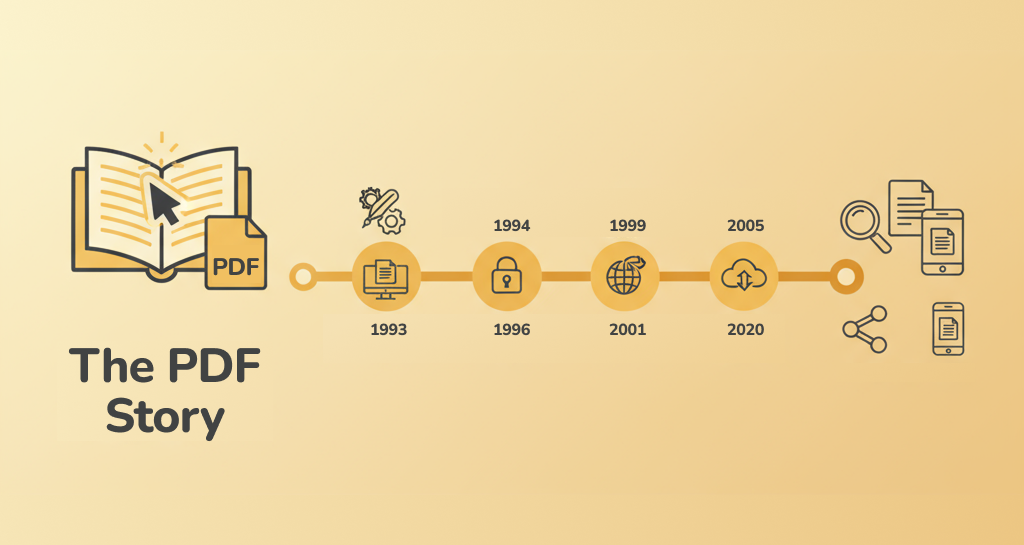
- 1991 — the internal Camelot memo (the universal page container idea).
- 1993-06-15 — Acrobat 1.0 and PDF launch.
- 1994 — Reader becomes free (Acrobat 2.0). Mass adoption begins.
- 1996–2001 — forms, annotations, transparency, Tagged PDF. The format becomes not just a “picture,” but a carrier of structure.
- 2001–2005 — PDF/X and PDF/A establish print and archiving practices.
- 2005–2006 — 3D annotations, stronger digital signatures, corporate maturity.
- 2008 — PDF 1.7 adopted as ISO 32000-1:2008.
- 2012+ — PDF/UA systematizes accessibility.
- 2017 / 2020 — PDF 2.0 (ISO 32000-2) and the 2020 dated revision. The ecosystem aligns on a modern base.
- 2020s — growth of local and web tools, digital signatures, archival profiles, and AI integrations without changing the core graphics model.
Time-Saving Glossary
- PostScript — Adobe’s printing language. Source of ideas for PDF.
- Acrobat Reader — the free PDF viewer and main adoption driver.
- Acrobat Distiller — converts PostScript to PDF.
- Tagged PDF — a document with semantics and tags for accessibility and reflow.
- PDF/A — archiving profile. Self-contained and predictable across decades.
- PDF/X — print profile. Strict rules so the job reaches the press intact.
- PDF/UA — accessibility profile. Mandatory structure for assistive tech.
- PDF/E — engineering profile. Drawings, 3D, CAD compatibility.
- ISO 32000-1/-2 — the international PDF specifications.
Common Myths and Short Answers
“PDF is obsolete. Only HTML matters.”
HTML is great for web pages and adaptive reading. PDF is needed where precise print layout, signatures, archival value, and identical appearance for everyone are critical.
“PDF can’t be accessible.”
It can and should be. Tagged PDF and PDF/UA exist for this. The work is meticulous, but the result is worth it.
“PDF is insecure.”
Any container can be abused. PDF supports AES encryption, digital signatures, and protection policies. It is a corporate standard.
“PDF is heavy.”
Compression (including object streams and JPEG2000), raster and font settings address size. Modern tools also compress smartly.
PDF to JPG — compact images
Convert to JPG with adjustable quality for smaller size and faster sharing.
Practice: How to Work With PDF in 2025
History is useful, but users need scenarios.
- Got a batch of scans to assemble — Merge PDF.
- Hitting email size limits — Compress PDF.
- Need to edit text — PDF → Word (DOCX).
- Extra spreads — Delete/Extract/Organize Pages.
- Confidential file — Protect PDF with AES encryption.
- Publishing regulations and reports — prepare PDF/A for the archive.
- File won’t open — try Repair PDF.
And yes, today you can do all of this locally in the browser, without uploading to a server — a key step for privacy and convenience.
Bottom Line in Plain Language
PDF was born from compatibility pain and grew into a universal container for the printed page. It was built by engineers tired of broken layouts. The free Reader gave the format wings. ISO set the rules. Subsets taught documents to be reliable in print, durable in archives, and accessible to everyone. PDF 2.0 cleaned house and aligned the ecosystem.
The future is about convenience and privacy. Do what you need with PDF without the cloud, right in your browser.
PDF to images — batch export
Export pages to PNG/JPG/WEBP. Set DPI and quality. Ideal for slides and social media.
FAQ: Short Questions on PDF History and Standards
Who invented PDF and when did it appear?
PDF was initiated by John Warnock (Adobe). The idea was set out in the internal Camelot memo in 1991. Public launch came with Acrobat 1.0 and PDF in June 1993.
Why was Reader made free?
A paid viewer slowed adoption. After 1994 the market embraced the format much faster.
Why did we need PDF 2.0?
To update and align the spec on a modern base, clarify formal parts of the format, and remove old ambiguities.
Is PDF/A a separate format?
No. It’s a profile of PDF with constraints for archiving.
Is PDF/X mandatory for print?
Not always, but many print shops require it to eliminate surprises.
How do I make PDF/A or optimize size?
Use tools that convert and validate profiles locally, and that can compress fonts and images without losing critical quality.
For People Who Create Documents Every Day
- Add tags and structure where assistive technologies will be used.
- Think about the archive early: PDF/A saves headaches years later.
- Check color profiles and fonts before print.
- Keep private docs password-protected and signed.
- Keep local tools at hand: fast and low-risk.
The story doesn’t end here. Now you know why PDF endures and how it serves you.
SEO Block: Key Queries This Article Answers
- what is pdf, who invented pdf, history of pdf
- when did pdf appear, pdf versions 1.4 1.5 1.7, what’s new in pdf 2.0
- what is pdf/a, pdf/x and how it differs, pdf/ua accessibility
- iso 32000 pdf standard, how to make pdf/a, pdf for print
- why pdf is popular, pdf vs html for print, how to check pdf tags
This page explains who, when, and why created PDF, how it evolved by versions, why ISO standardization secured it for years, and shows concrete workflows.
Merge PDFs — drag, drop, and reorder
Combine multiple files into a single document. Reorder pages with drag-and-drop. Private and watermark-free.